How to Build a Home Office in a Small Bedroom
Fit a workspace into a bedroom or a living-room corner without wrecking your posture or your sleep: where to put the desk, how to set it up and how to make it disappear at night.
In this article
- What you need to know first
- Step 1: Pick the spot
- Step 2: Try it for a week, for free
- Step 3: Choose a desk that fits
- Step 4: Set it up for your body
- Step 5: Get the light right
- Step 6: Control the cables
- Step 7: Make it disappear
- Products that can help
- Common mistakes to avoid
- What to do next
- Frequently asked questions
What you need to know first
You do not need a spare room to work well from home. You need about one square metre, a surface at the right depth, a screen at the right height and a way to make it disappear at six o'clock.
A bedroom office has two jobs that pull against each other: it must be comfortable enough to work at for hours, and easy enough to ignore that you can still sleep. Most small home offices fail for three reasons. The desk is too shallow, so the screen sits too close. The laptop sits flat, so you look down all day. And the work never goes away, so the room stops feeling like home.
Get the position and the setup right, and the furniture can be simple. The same steps work for a corner of a living room.
Step 1: Pick the spot
Walk the room and look for a stretch of wall about 40 inches (1 metre) wide. The usual candidates:
- Beside the window, with the desk at right angles to it. You get daylight from the side without glare on the screen or a silhouette on video calls.
- A corner. OSHA notes that a corner often gives more desk depth than a straight run of desktop, because the screen can sit back into the angle.
- An alcove or the space beside a wardrobe.
- Inside a closet, with the doors closing on it at night.
- The foot of the bed, if the room is long and narrow.
Then run three checks. Is there a socket within reach, so no lead crosses a walkway? Is there a wall behind the screen, not the room, so you are less distracted? And is there room to push the chair back?
If you can, face away from the bed while you work and away from the desk while you sleep. The room size calculator helps you check the spot before you shop.
Step 2: Try it for a week, for free
Before you spend anything, work at the spot for a week with the laptop raised on a stack of books and a lamp borrowed from another room. You will learn what you need. Clear one nearby shelf for work things, so the surface can be emptied at the end of the day.
Step 3: Choose a desk that fits
Measure before you shop. For a laptop and a notebook, a top about 32 to 40 inches (80 to 100 cm) wide and 20 inches (50 cm) deep is workable. If you use a separate monitor, look for about 24 inches (60 cm) of depth, so the screen can sit far enough away.
Options for tight rooms:
- A slim writing desk with a drawer for clearing away at night.
- A wall-mounted fold-down desk that closes flat. This needs drilling, so ask your landlord.
- A ladder or leaning desk that adds shelves above the work surface.
- A folding desk you can put away entirely, which suits two or three days a week at home.
The furniture fit calculator checks a desk against the room and the door.
Step 4: Set it up for your body
Good posture is mostly geometry. Guidance from the US Occupational Safety and Health Administration (OSHA) comes down to a few checks:
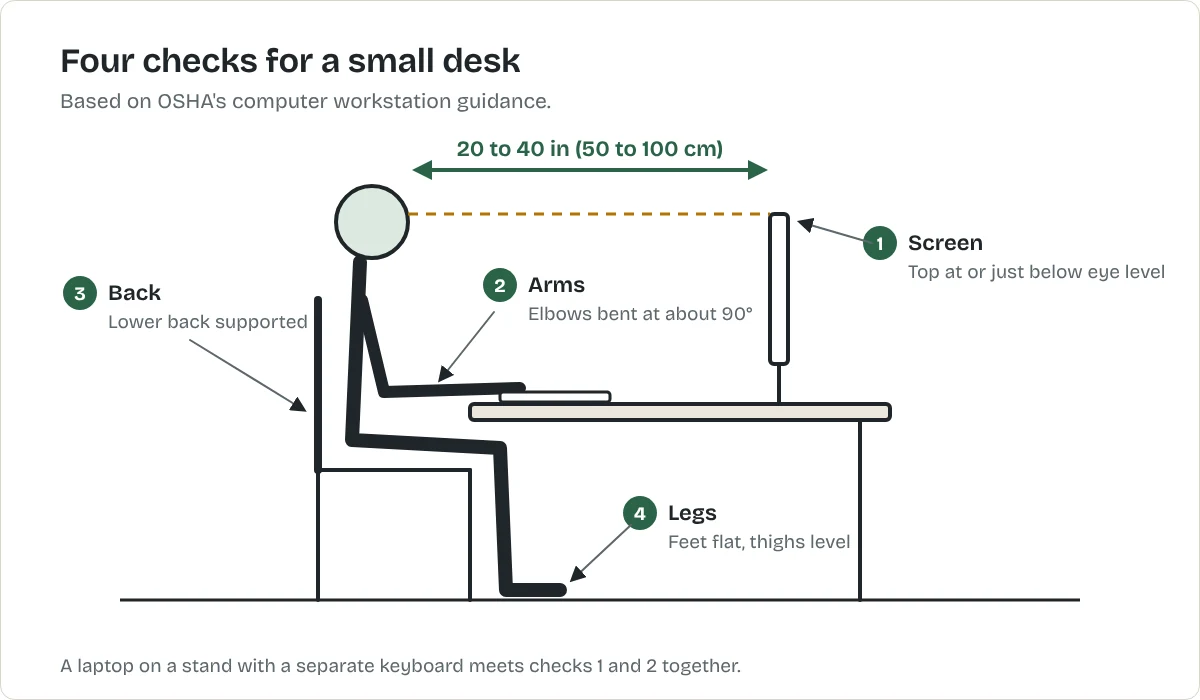
- Screen: at least 20 inches (50 cm) from your eyes, with 20 to 40 inches the preferred range, and the top of the screen at or slightly below eye level.
- Arms: elbows close to your body and bent at roughly a right angle, wrists straight.
- Back: lower back supported by the chair.
- Legs: feet flat on the floor or on a footrest, thighs roughly level.
A laptop on its own cannot meet the first two at once. A laptop stand, or a stack of books, plus a separate keyboard and mouse fixes that for little money. If you use a monitor, a clamp-on arm lifts it off the desk and frees the surface beneath.
If there is no room for an office chair, choose a dining-style chair with a firm seat and add a lumbar cushion. Stand up and move every half hour or so, whatever you sit on.
Step 5: Get the light right
Use daylight from the side where possible. Add a desk lamp with an adjustable arm for the evenings, aimed at your work and not at the screen. On video calls, light from in front of you is more flattering than light from behind. If the corner is dark overall, see how to brighten a dark apartment without rewiring.
Step 6: Control the cables
Cables are what make a bedroom desk look like an office. Use one surge-protected extension lead, fix it under the desk in a cable tray or with adhesive clips, and run a single lead to the wall. Label the chargers. Before you stick anything to the desk or wall, check what adhesive hooks and strips really hold.
Step 7: Make it disappear
- Clear the desk into a drawer or box at the end of the day.
- Close the laptop and put it out of sight.
- Use a screen, a curtain on a tension rod or the closet doors to hide the desk if seeing it keeps your mind on work.
- Keep work lighting separate from bedside lighting, and switch the first off when you finish. A smart plug can do that on a schedule; see smart plugs for beginners.
Products that can help
Best for raising a laptop screen to eye level
Adjustable laptop stand
A folding stand that lifts the laptop so the top of the screen sits near eye level. This is a type of product, not one model. The button opens the retailer's results for it, so compare a few before you choose.
What we like
- Fixes the biggest posture problem of laptop working
- Folds flat, so the desk can be cleared at night
- Improves airflow under the laptop
What to know
- You need a separate keyboard and mouse to use it properly
- Light stands can wobble when you type on the laptop itself
- Check the stand's weight and size limits against your laptop
United States
United Kingdom
Not listed with our CA retailers yet.
Not listed with our AU retailers yet.
Research-based recommendation: we have not tested this product ourselves. How we evaluate products. Details checked October 2026.
Best for freeing desk space under a monitor
Single monitor arm with desk clamp
An arm that clamps to the desk edge and holds the monitor off the surface. This is a type of product, not one model. The button opens the retailer's results for it, so compare a few before you choose.
What we like
- Clears the desk beneath the screen
- Height and distance adjust in seconds
- Clamps to the desk: no holes in the wall
What to know
- Check your monitor's weight and VESA mount size against the arm
- The clamp needs a solid desk edge of the right thickness
- A desk pushed tight to a wall leaves the arm little room to move
United States
United Kingdom
Not listed with our CA retailers yet.
Not listed with our AU retailers yet.
Research-based recommendation: we have not tested this product ourselves. How we evaluate products. Details checked October 2026.
Best for hiding a power strip and its cables
Clamp-on under-desk cable tray
A tray that clamps under the desktop and holds the extension lead and spare cable. This is a type of product, not one model. The button opens the retailer's results for it, so compare a few before you choose.
What we like
- Gets cables and the power strip off the floor
- Leaves one lead running to the wall
- Clamp-on models need no screws
What to know
- Clamps need a desktop edge of the right thickness
- Check the tray is long enough for your power strip
- Does not fit desks with a deep frame or drawer under the top
United States
United Kingdom
Not listed with our CA retailers yet.
Not listed with our AU retailers yet.
Research-based recommendation: we have not tested this product ourselves. How we evaluate products. Details checked October 2026.
Common mistakes to avoid
- Working from the bed. It is hard on your back and blurs the line between work and rest.
- Putting the screen in front of the window. The glare is tiring.
- Buying a large desk "to be safe". In a small bedroom the desk you can walk around beats the desk with more surface.
What to do next
For storage around the desk, see 21 small apartment storage ideas. To make the whole room work harder, read how to make a small apartment feel bigger.
Frequently asked questions
How much space do I need for a desk in a bedroom?
A desk around 32 to 40 inches (80 to 100 cm) wide and 20 inches (50 cm) deep suits a laptop setup. Allow room behind it to pull the chair out.
How deep should a desk be for a monitor?
About 24 inches (60 cm) is a practical guide. OSHA recommends keeping the screen at least 20 inches from your eyes, and the monitor's stand takes up some of the depth.
Is it bad to have a home office in the bedroom?
It can make switching off harder. Positioning the desk out of view from the bed and clearing it away each evening helps keep work and sleep separate.
How high should my monitor be?
OSHA's guidance is to place the top of the screen at or slightly below eye level, at least 20 inches from you.
Can I use a dining chair as an office chair?
For shorter sessions, yes, if your feet rest flat and your lower back is supported. Add a cushion for lumbar support and take regular breaks.
Can I mount a monitor without drilling?
Yes. A monitor arm with a desk clamp attaches to the desk edge and leaves the wall untouched.
Sources
Related articles
Home Office
Ergonomic Desk Setup: Chair, Keyboard and Screen Heights
Set up any desk in five steps: chair height first, then keyboard, screen, light and breaks. Based on OSHA's computer workstation guidance, with fixes for laptops and small spaces.
Apartment Living
The Small Apartment Living Guide
Everything that makes a small apartment easier to live in, in one place: storage, furniture, light, noise, air, cleaning, work and renter-safe upgrades.
Small-Space Furniture
How to Choose Furniture for a Small Apartment
What to measure, which features earn their floor space and how to avoid the sofa that will not fit through the door.