Smart Plugs for Beginners: What They Do and Where to Start
A smart plug is the cheapest way into a smart home, and renters can take it with them. Here is what it can and cannot do, what to plug in first and what to check before buying.
In this article
What you need to know first
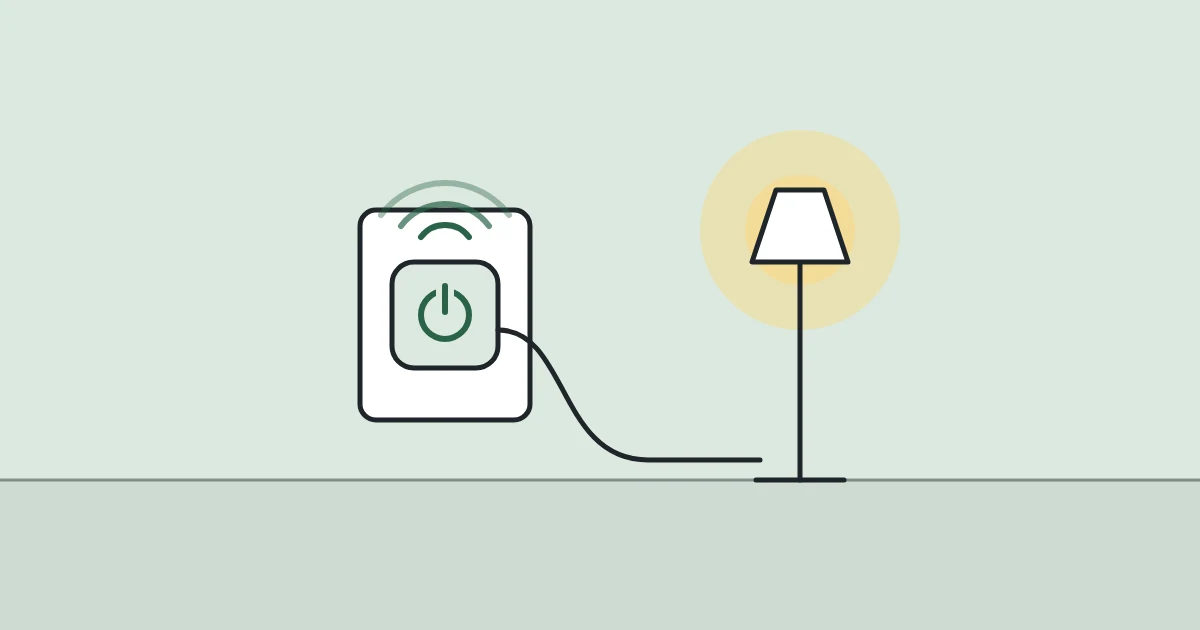
A smart plug is the simplest piece of smart-home kit you can buy. It sits between the wall socket and an ordinary appliance and lets you switch that appliance from your phone, by voice or on a schedule. Nothing is wired in, so it is safe for a rental and leaves with you when you move.
What a smart plug does
A smart plug is a remote-controlled switch. It connects to your home Wi-Fi and cuts or restores power to whatever is plugged into it.
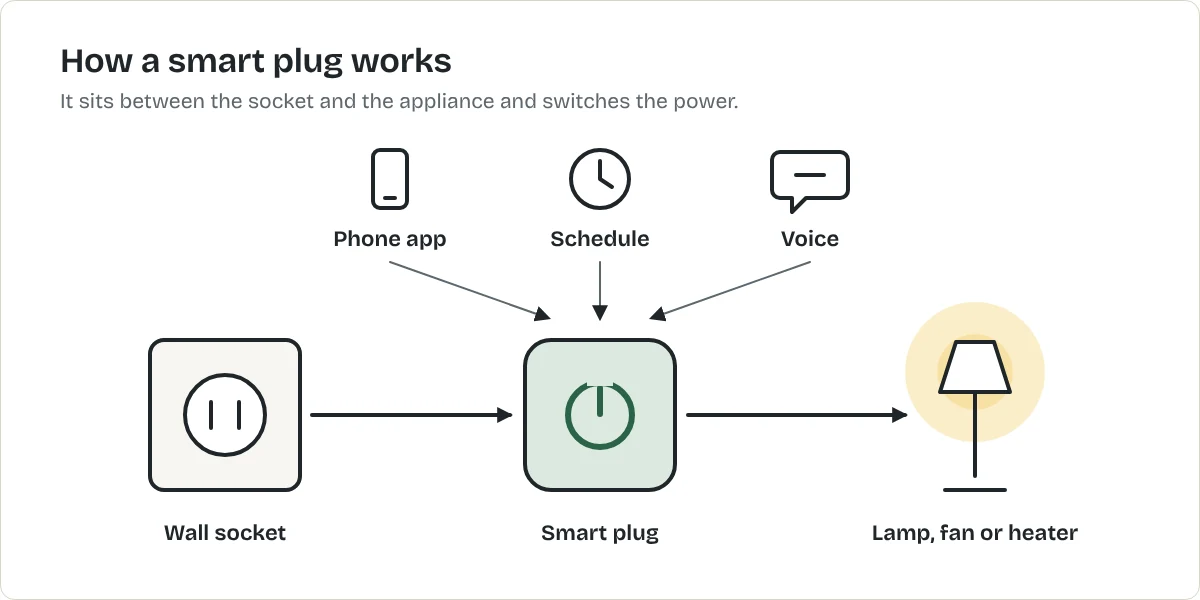
That gives you four things:
- Remote control. Turn a lamp off from bed or from work.
- Schedules. Lamps on at dusk, off at 11 pm.
- Voice control, if you use Alexa, Google Assistant or Siri.
- Energy monitoring, on some models. The app shows how much electricity the appliance uses.
What it cannot do
A smart plug only switches power. It cannot press buttons. So it works with appliances that start when power arrives, and not with appliances that wait for you to press start.
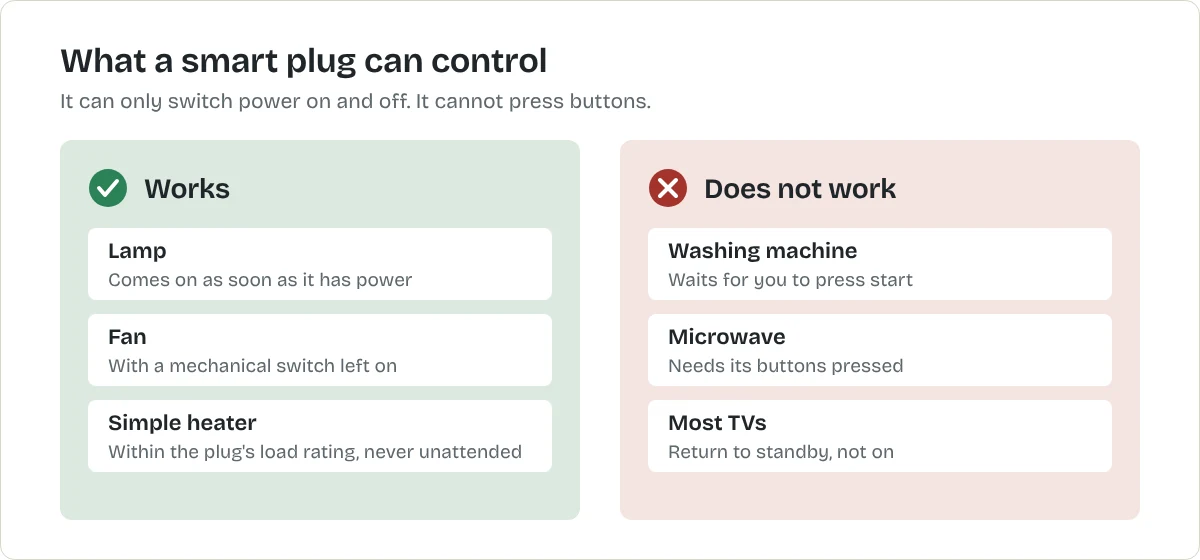
Test before you buy: unplug the appliance while it is running, then plug it back in. If it comes back on by itself, a smart plug can control it.
The first three things to plug in
- A lamp. Put your main living-room lamp on a sunset schedule. It is the upgrade people notice every day. For more ways to add light, see how to brighten a dark apartment without rewiring.
- A fan or air purifier. Run it for an hour before you get home. How to improve air quality in a small apartment explains how to size a purifier.
- The TV corner. Put the TV, console and soundbar on one power strip, then plug the strip into an energy-monitoring smart plug. You see what standby costs and can switch it all off overnight. What do your appliances cost to run? shows how to turn that reading into money.
What to check before you buy
- Load rating. Every smart plug has a maximum load. In the US this is usually 15 amps (1,800 watts). In the UK it is usually 13 amps. Check the label on your appliance and stay under the limit.
- Wi-Fi band. Most smart plugs use 2.4 GHz Wi-Fi only. Almost every home router provides it, but check if yours is set to 5 GHz only.
- Hub or no hub. Wi-Fi plugs need no hub, which keeps the cost down and the setup short.
- Size. A bulky plug can block the socket next to it. Look for a compact or "mini" shape.
- Matter. Matter is a shared standard that lets one plug work with Apple, Google, Amazon and Samsung systems. It is useful if you might change phones or assistants later, but not essential for a first plug.
US and UK plugs are not interchangeable. The pins and the voltage differ, so buy the model sold for your country.
Products that can help
In the United States, our research-based pick is a compact Wi-Fi plug with energy monitoring.
Best for a first smart plug in the US
TP-Link
Kasa Smart Plug Mini EP25
A compact Wi-Fi smart plug with energy monitoring. No hub is needed. US plug and voltage only.
- Real-time and historical energy monitoring in the Kasa app
- Works with Amazon Alexa, Google Assistant, Apple Home (Siri) and Samsung SmartThings
What we like
- Shows what the plugged-in appliance actually uses
- Compact, so it should not block the second outlet
- UL-certified, flame-retardant housing
What to know
- Not a Matter device; TP-Link sells a separate Matter model
- Maximum load is 15 A / 1,800 W: check heaters and other high-power appliances against it
- US model only: it will not work in UK sockets
- Maximum load
- 15 A / 1,800 W
- Energy monitoring
- Yes
- Hub required
- No
- Warranty
- 2-year limited
United States
Not listed with our UK retailers yet.
Not listed with our CA retailers yet.
Not listed with our AU retailers yet.
Research-based recommendation: we have not tested this product ourselves. How we evaluate products. Details checked October 2026. Specifications from TP-Link's product announcement.
In the UK, our research-based pick is a compact 13-amp Wi-Fi plug with energy monitoring.
Best for a first smart plug in the UK
TP-Link
Tapo P110 Mini Smart Wi-Fi Plug
A compact 13 A Wi-Fi smart plug with energy monitoring in the Tapo app. No hub is needed. UK plug only.
- Energy monitoring in the Tapo app
- Works with Amazon Alexa and Google Assistant
What we like
- Shows what the plugged-in appliance actually uses
- Compact body
- No hub required
What to know
- Connects on 2.4 GHz Wi-Fi only
- TP-Link says not to use it with large-motor appliances such as air conditioners
- The plug itself draws a little power: 0.64 W in standby by TP-Link's figures
- Maximum load
- 13 A / 2,990 W
- Energy monitoring
- Yes
- Wi-Fi
- 2.4 GHz
- Hub required
- No
- Size
- 51 × 72 × 40 mm
Not listed with our US retailers yet.
United Kingdom
Not listed with our CA retailers yet.
Not listed with our AU retailers yet.
Research-based recommendation: we have not tested this product ourselves. How we evaluate products. Details checked October 2026. Specifications from TP-Link's UK product page.
Safety
- Never exceed the plug's load rating.
- Do not schedule anything that would be unsafe to start while you are out, such as an iron or an unattended heater.
- Use indoor plugs indoors. Outdoor plugs are a separate, weather-rated product.
- Buy plugs that carry a recognised safety mark, such as UL in the US or UKCA in the UK.
Do smart plugs save electricity?
A smart plug saves nothing by itself, and it uses a small amount of power to stay connected. The saving comes from what you switch off. An energy-monitoring plug shows which appliances draw power in standby, so you can decide which are worth switching off. Put your numbers into the electricity cost calculator to see the yearly figure.
What to do next
Once a plug or two is working, smart bulbs and a smart speaker are the usual next steps. Smart home setup for a first apartment puts them in order, and the smart home starter quiz suggests where to begin in your home.
Frequently asked questions
Do smart plugs work without Wi-Fi?
Schedules already saved to the plug usually keep running. Remote control and voice control need Wi-Fi and an internet connection.
Can I use a smart plug in a rented apartment?
Yes. It plugs into an existing socket, changes nothing in the wiring and goes with you when you leave.
Can I plug a heater into a smart plug?
Only if the heater's wattage is under the plug's rating and both makers say it is suitable, and never on a schedule that starts it while nobody is home.
Do I need a hub?
Not for Wi-Fi smart plugs. They connect straight to your router.
Do smart plugs use electricity when off?
A smart plug draws a small amount of power to stay connected. TP-Link, for example, lists 0.64 watts in standby for its Tapo P110.
Sources
Related articles
Smart Home
Smart Home Setup for a First Apartment
A simple, renter-safe smart home in four stages. Nothing here needs rewiring, and all of it moves with you.
Smart Home
What Is Matter and Do You Need It?
Matter is a shared standard that lets one smart device work with Apple Home, Google Home, Alexa and others. What it is, what Thread has to do with it, and when it matters for you.
Smart Home
Alexa vs Google Home vs Apple Home: Which to Start With
The best smart home system is usually the one that matches your phone. How Alexa, Google Home and Apple Home compare, and why Matter makes the choice less permanent.