What Is Matter and Do You Need It?
Matter is a shared standard that lets one smart device work with Apple Home, Google Home, Alexa and others. What it is, what Thread has to do with it, and when it matters for you.
In this article
What you need to know first
For years, smart devices came in camps: a plug might work with Alexa and Google but not Apple, or need its own hub. Matter is a shared standard designed to end that. A Matter device can be added to any Matter-compatible system, and to more than one at once.
Matter is run by the Connectivity Standards Alliance. It began in 2019 as a project between Amazon, Apple, Google and the Zigbee Alliance (now the CSA), and version 1.0 was released in October 2022. It has been updated regularly since, adding more kinds of device.
How it works, in plain terms
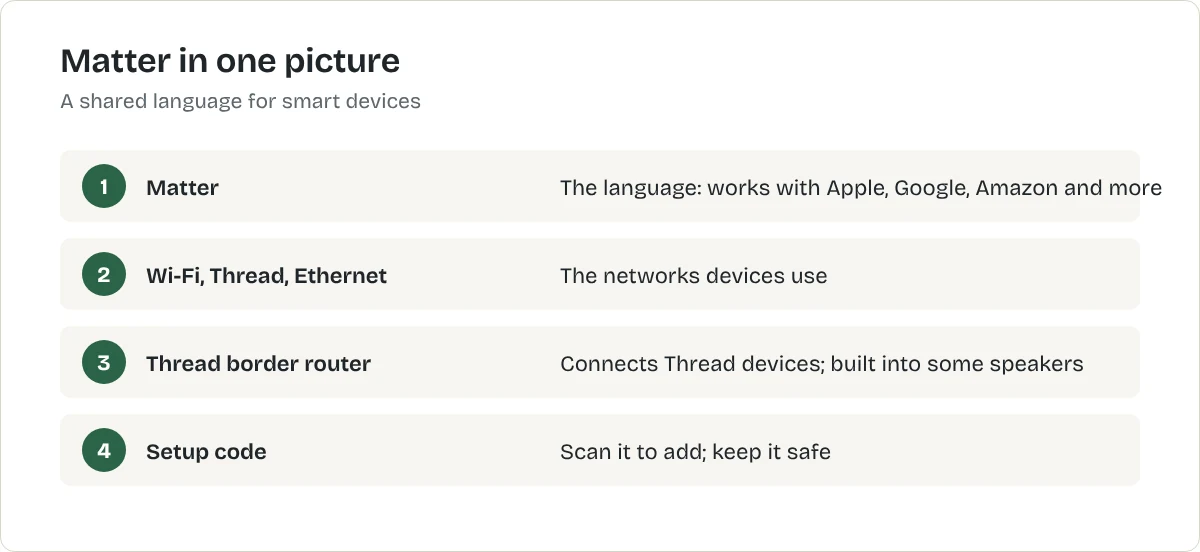
- Matter is the language. Devices and controllers agree on how to describe "turn on", "set to 50%" or "is the door open".
- Wi-Fi, Thread and Ethernet are the roads. Matter devices talk over your Wi-Fi, over Thread, or over a cable.
- A controller runs it. Your phone app and, often, a smart speaker or hub. Most current speakers from the big brands can act as Matter controllers.
What is Thread?
Thread is a low-power mesh network designed for small devices, especially battery-powered ones such as sensors. Devices pass messages to each other, so the network gets stronger as you add more. To connect Thread devices to the rest of your home, you need a Thread border router. Several smart speakers and hubs include one; check the model.
What kinds of device support Matter?
Matter started with the basics: lights, plugs, switches, door locks, thermostats, blinds, sensors and TVs. Later versions added more, including appliances, robot vacuums, air quality sensors, fans and energy devices. Support varies by product, so check each listing.
When does it matter for you?
- You might change phone or speaker system. Matter devices move with you.
- Your household uses more than one system. One device can work in Apple Home and Google Home at the same time.
- You want fewer apps. You can run Matter devices from the system app instead of each maker's app.
If you are happy with one system and never plan to change, Matter is a nice extra rather than a must. It is still the safer choice when two products are otherwise equal.
How to set up a Matter device
- Open your system's home app (Apple Home, Google Home, Alexa or similar).
- Choose to add a device and scan the Matter QR code on the device or its box. Keep that code; you may need it again.
- Name the device by room and job.
- To add it to a second system, use the "share" or "linked apps" option in the first app.
Matter products to start with
A Matter smart plug is the simplest first device:
Best for a US smart plug that works with any Matter system
TP-Link
Kasa Smart Plug Mini KP125M (Matter)
A compact Matter-certified Wi-Fi smart plug with energy monitoring. US plug only.
- Matter certified
- Energy monitoring
- Works with Alexa, Google Home and Apple Home
What we like
- One plug works across Apple, Google, Amazon and other Matter systems
- Shows what the plugged-in appliance uses
- Compact body
What to know
- 2.4 GHz Wi-Fi only
- Maximum load 15 A / 1,800 W: check heaters against it
- US model only
- Maximum load
- 15 A / 1,800 W
- Matter
- Yes
- Energy monitoring
- Yes
- Wi-Fi
- 2.4 GHz
United States
Not listed with our UK retailers yet.
Not listed with our CA retailers yet.
Not listed with our AU retailers yet.
Research-based recommendation: we have not tested this product ourselves. How we evaluate products. Details checked October 2026. Specifications from TP-Link's US store and product page.
Best for lamps and ceiling lights you are allowed to keep
Matter smart LED bulb
A Wi-Fi or Thread LED bulb with dimming and schedules that works with Alexa, Google Home and Apple Home through Matter. This is a type of product, not one model. The button opens the retailer's results for it, so compare a few before you choose.
What we like
- Fits your existing fittings
- Dimming and colour temperature without new switches
- Matter keeps your options open if you change systems
What to know
- Only works while the wall switch stays on
- Fittings differ: E26 in the US, B22 or E27 in the UK
- Thread versions need a Thread border router, such as some smart speakers
United States
United Kingdom
Not listed with our CA retailers yet.
Not listed with our AU retailers yet.
Research-based recommendation: we have not tested this product ourselves. How we evaluate products. Details checked October 2026.
Common mistakes to avoid
- Throwing away the setup code.
- Assuming every feature is in Matter. Some advanced features still need the maker's app.
- Buying Thread devices with no border router.
What to do next
Choose your main system with Alexa vs Google Home vs Apple Home, then start with a smart plug. The smart home starter guide sets out the order.
Thread and hubs
Some Matter devices use Thread, a low-power network that needs a Thread border router. Many recent smart speakers and hubs from Apple, Google and Amazon act as one. Wi-Fi Matter devices need no extra hardware. Check the box for which a device uses and what it needs.
Should you wait for Matter?
No. You can buy Matter devices now, and many older devices work through a hub or bridge. If you are starting from scratch, choosing Matter-certified devices keeps your options open.
Frequently asked questions
What does Matter do?
It lets a smart device work with any Matter-compatible system, such as Apple Home, Google Home, Alexa or SmartThings, instead of only its maker's app.
What is the difference between Matter and Thread?
Matter is the common language devices speak. Thread is one of the networks they can use to talk, alongside Wi-Fi and Ethernet.
Do I need to replace my old devices?
No. Older devices keep working in the systems they already support. Look for Matter when you buy new ones.
Sources
Related articles
Smart Home
Best Smart Home Devices for Beginners
Start a smart home with three or four devices that solve real problems: a smart plug, a smart bulb, a speaker to control them and a leak sensor under the sink.
Smart Home
Best Smart Plugs
Three smart plugs compared on the specifications that matter: load rating, energy monitoring, Matter and which country's socket they fit.
Smart Home
Best Smart Lights for Renters
Smart bulbs, light strips and a smart plug on a lamp all work without rewiring. Here is which to choose, and the one thing that catches renters out.