Small Apartment Home Office Ideas
Eight ways to fit a workspace into a small apartment, from a corner desk to a closet office, with the measurements that make each one work.
In this article
What you need to know first
You need less space than you think: about 40 inches (1 metre) of wall, a surface deep enough to keep the screen at least 20 inches from your eyes, and a way to put work away at night. Any of the ideas below can give you that. The full set-up, from desk depth to cable control, is in how to build a home office in a small bedroom.
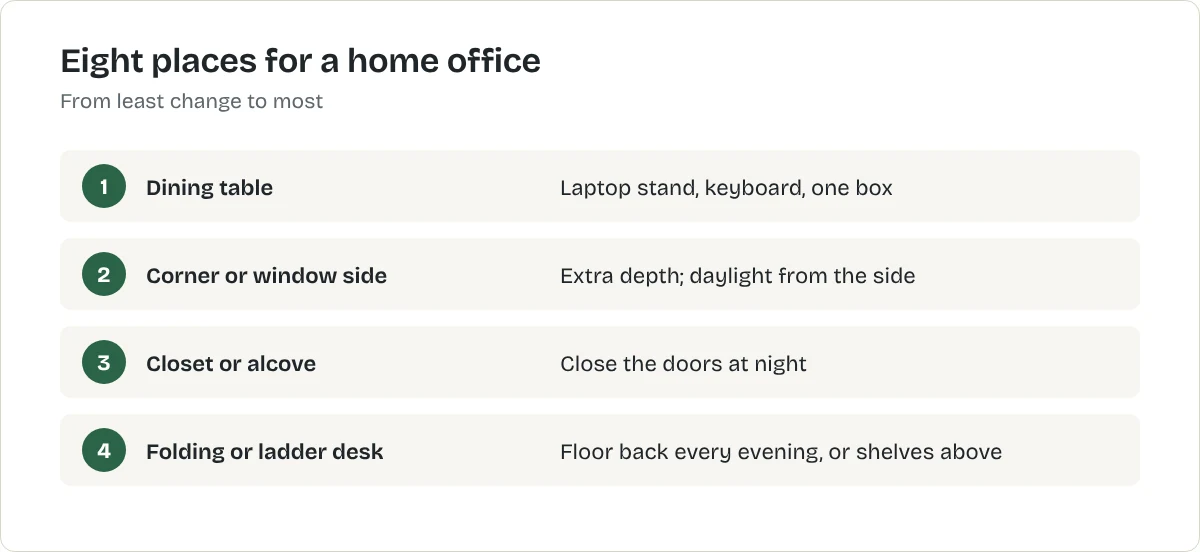
Eight ideas, from least to most change
1. The dining table, set up properly
Work at the table with the laptop raised on a stand and a separate keyboard and mouse. Keep everything in one box that goes on a shelf at the end of the day. It costs almost nothing and tells you what you really need before you buy a desk.
Best for raising a laptop screen to eye level
Adjustable laptop stand
A folding stand that lifts the laptop so the top of the screen sits near eye level. This is a type of product, not one model. The button opens the retailer's results for it, so compare a few before you choose.
What we like
- Fixes the biggest posture problem of laptop working
- Folds flat, so the desk can be cleared at night
- Improves airflow under the laptop
What to know
- You need a separate keyboard and mouse to use it properly
- Light stands can wobble when you type on the laptop itself
- Check the stand's weight and size limits against your laptop
United States
United Kingdom
Not listed with our CA retailers yet.
Not listed with our AU retailers yet.
Research-based recommendation: we have not tested this product ourselves. How we evaluate products. Details checked October 2026.
2. A corner desk
Corners give extra depth for a screen and tuck the desk out of the walkway. OSHA notes that a corner often gives more desk depth than a straight run of desktop.
3. Beside the window
Put the desk at right angles to the window. You get daylight from the side, with no glare on the screen and no silhouette on video calls.
4. The closet office
A deep closet or wardrobe with the rail removed holds a narrow desk and shelves. Close the doors at night and the office disappears. Check there is a socket nearby and some airflow.
5. An alcove or the space beside a wardrobe
Measure the width carefully. Alcoves often have a radiator or socket that decides where the desk can go.
6. A folding or wall-mounted desk
A desk that folds flat gives the floor back every evening. Compare the options in best folding desks.
7. A ladder desk
Shelves above the work surface use wall height you are not using now. See best compact home office desks.
8. A desk behind the sofa
A slim console-height desk behind a sofa that floats in the room makes a work zone without a wall. It suits laptops more than monitors.
Making any of them work
- Raise the screen so the top is at or slightly below eye level. Our ergonomic desk setup guide gives every height.
- Light from the side, plus a desk lamp for evenings.
- One lead to the wall, with cables in a tray under the desk.
- An end-of-day routine. Close the laptop, clear the desk and switch off the work lamp.
Common mistakes to avoid
- Working from the sofa or bed for long periods. It is hard on your back and blurs work and rest.
- Buying a big desk "just in case". In a small room, the desk you can walk around wins.
- Ignoring noise. If you share the flat, a door that closes or a pair of headphones matters more than the desk.
What to do next
Measure two or three candidate spots with the room size calculator, try the dining-table setup for a week, then choose. If you want to stand some of the day, read standing desks for small spaces.
Separate work from home
When the desk is in the living room or bedroom, finishing work is harder. Small rituals help: close the laptop and put it in a drawer at the end of the day, switch off the desk lamp, or cover the desk with a cloth. A folding screen or bookcase that hides the desk from the sofa or bed makes the boundary physical.
Make video calls look good
Face a window or put a lamp behind the screen so light falls on your face. Raise the camera to eye level with a laptop stand. Check what is behind you; a bookshelf or plain wall is better than an unmade bed.
Storage for paperwork
Keep paper to a minimum: scan and shred what you can. A single file box or a drawer unit under the desk holds the rest.
Frequently asked questions
Where should I put a desk in a small apartment?
Beside a window, with daylight from the side; in a corner, which gives extra depth for a screen; or in an alcove or closet that can be closed off at night.
How much space do I need for a home office?
About 40 inches (1 metre) of wall for a small desk, plus roughly 30 inches (75 cm) behind it to pull the chair out.
Can I work at the dining table?
Yes, if you raise the laptop on a stand, use a separate keyboard and mouse, and clear everything into a box at the end of the day.
Sources
Related articles
Home Office
How to Build a Home Office in a Small Bedroom
Fit a workspace into a bedroom or a living-room corner without wrecking your posture or your sleep: where to put the desk, how to set it up and how to make it disappear at night.
Home Office
Ergonomic Desk Setup: Chair, Keyboard and Screen Heights
Set up any desk in five steps: chair height first, then keyboard, screen, light and breaks. Based on OSHA's computer workstation guidance, with fixes for laptops and small spaces.
Home Office
Best Compact Home Office Desks
A small room can hold a good desk if you choose the type first and the model second. Here is how a compact desk, a ladder desk and a folding desk compare.