Best Smart Home Devices for Beginners
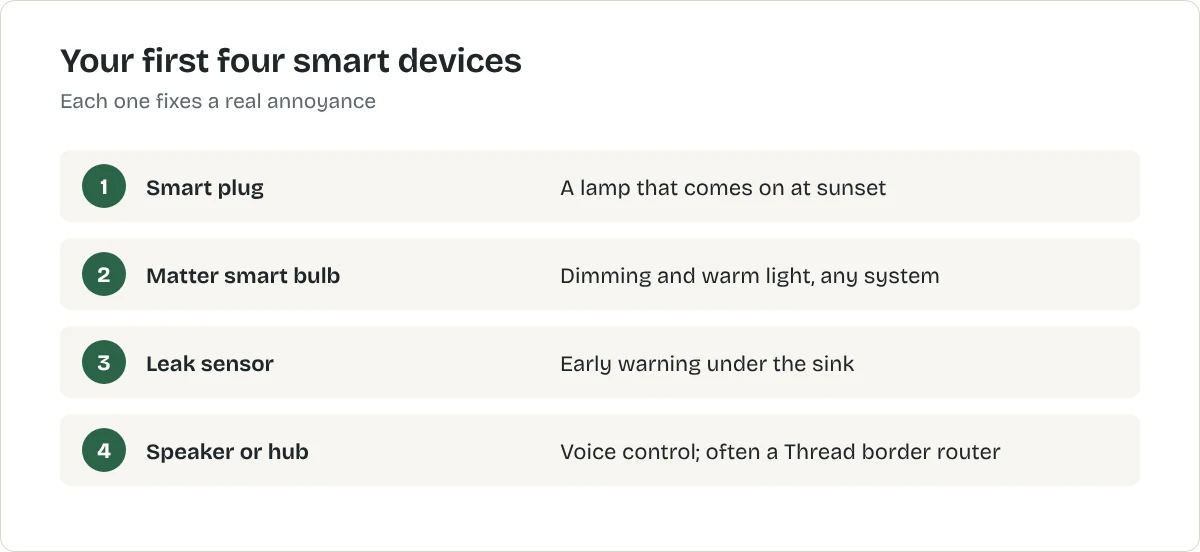
Start a smart home with three or four devices that solve real problems: a smart plug, a smart bulb, a speaker to control them and a leak sensor under the sink.
In this article
The problem this solves
Smart home shops make it look as if you need a hub, a dozen sensors and a subscription before anything works. You do not. Three or four devices that each solve a real annoyance are a better start than a starter kit full of things you will never set up.
Choose your system first
Pick the app you will use for everything, usually the one that matches your phone: Apple Home for iPhone households, Google Home for Android, or Alexa if you already have Echo speakers. Then buy devices that work with it. Devices with the Matter logo work with all three, which keeps your options open; what is Matter explains how. If you are undecided, our comparison of Alexa, Google Home and Apple Home helps.
What to look for
- No hub needed, at least for your first devices.
- Renter-safe: plugs in, screws in or sits on a shelf.
- Matter, where available.
- A clear job. If you cannot say what annoyance it fixes, skip it.
Our picks at a glance
| Product | Best for | Price | Where to buy |
|---|---|---|---|
| Kasa Smart Plug Mini KP125M (Matter)TP-Link | a US smart plug that works with any Matter system | US: See retailerUK: See retailerCA: See retailerAU: See retailerChoose a country | United States
Not listed with our UK retailers yet. Not listed with our CA retailers yet. Not listed with our AU retailers yet. Where are you shopping? |
| Tapo P110 Mini Smart Wi-Fi PlugTP-Link | a first smart plug in the UK | US: See retailerUK: See retailerCA: See retailerAU: See retailerChoose a country | Not listed with our US retailers yet. United Kingdom
Not listed with our CA retailers yet. Not listed with our AU retailers yet. Where are you shopping? |
| Matter smart LED bulb | lamps and ceiling lights you are allowed to keep | US: See retailerUK: See retailerCA: See retailerAU: See retailerChoose a country | United States
United Kingdom
Not listed with our CA retailers yet. Not listed with our AU retailers yet. Where are you shopping? |
| Smart water leak sensor | under sinks and beside the washing machine | US: See retailerUK: See retailerCA: See retailerAU: See retailerChoose a country | United States
United Kingdom
Not listed with our CA retailers yet. Not listed with our AU retailers yet. Where are you shopping? |
Swipe sideways to see every column.
The picks in detail
1. A smart plug, for a lamp on a schedule
The cheapest and most useful first device. Smart plugs for beginners explains what it can and cannot control.
Best for a US smart plug that works with any Matter system
TP-Link
Kasa Smart Plug Mini KP125M (Matter)
A compact Matter-certified Wi-Fi smart plug with energy monitoring. US plug only.
- Matter certified
- Energy monitoring
- Works with Alexa, Google Home and Apple Home
What we like
- One plug works across Apple, Google, Amazon and other Matter systems
- Shows what the plugged-in appliance uses
- Compact body
What to know
- 2.4 GHz Wi-Fi only
- Maximum load 15 A / 1,800 W: check heaters against it
- US model only
- Maximum load
- 15 A / 1,800 W
- Matter
- Yes
- Energy monitoring
- Yes
- Wi-Fi
- 2.4 GHz
United States
Not listed with our UK retailers yet.
Not listed with our CA retailers yet.
Not listed with our AU retailers yet.
Research-based recommendation: we have not tested this product ourselves. How we evaluate products. Details checked October 2026. Specifications from TP-Link's US store and product page.
Best for a first smart plug in the UK
TP-Link
Tapo P110 Mini Smart Wi-Fi Plug
A compact 13 A Wi-Fi smart plug with energy monitoring in the Tapo app. No hub is needed. UK plug only.
- Energy monitoring in the Tapo app
- Works with Amazon Alexa and Google Assistant
What we like
- Shows what the plugged-in appliance actually uses
- Compact body
- No hub required
What to know
- Connects on 2.4 GHz Wi-Fi only
- TP-Link says not to use it with large-motor appliances such as air conditioners
- The plug itself draws a little power: 0.64 W in standby by TP-Link's figures
- Maximum load
- 13 A / 2,990 W
- Energy monitoring
- Yes
- Wi-Fi
- 2.4 GHz
- Hub required
- No
- Size
- 51 × 72 × 40 mm
Not listed with our US retailers yet.
United Kingdom
Not listed with our CA retailers yet.
Not listed with our AU retailers yet.
Research-based recommendation: we have not tested this product ourselves. How we evaluate products. Details checked October 2026. Specifications from TP-Link's UK product page.
2. A Matter smart bulb, for dimming and warm evening light
Best for lamps and ceiling lights you are allowed to keep
Matter smart LED bulb
A Wi-Fi or Thread LED bulb with dimming and schedules that works with Alexa, Google Home and Apple Home through Matter. This is a type of product, not one model. The button opens the retailer's results for it, so compare a few before you choose.
What we like
- Fits your existing fittings
- Dimming and colour temperature without new switches
- Matter keeps your options open if you change systems
What to know
- Only works while the wall switch stays on
- Fittings differ: E26 in the US, B22 or E27 in the UK
- Thread versions need a Thread border router, such as some smart speakers
United States
United Kingdom
Not listed with our CA retailers yet.
Not listed with our AU retailers yet.
Research-based recommendation: we have not tested this product ourselves. How we evaluate products. Details checked October 2026.
3. A leak sensor under the sink
Small, cheap and sometimes the device that saves you most: an early alert can stop a leak reaching the flat below. Check whether it needs a hub from the same maker.
Best for under sinks and beside the washing machine
Smart water leak sensor
A small battery sensor that sends a phone alert when it detects water. This is a type of product, not one model. The button opens the retailer's results for it, so compare a few before you choose.
What we like
- Early warning before a leak spreads to a neighbour
- Sits on the floor: no fixing
- Battery lasts a long time
What to know
- Many need a hub from the same maker: check before buying
- Only detects water where it sits
- Alerts need your phone and Wi-Fi to work
United States
United Kingdom
Not listed with our CA retailers yet.
Not listed with our AU retailers yet.
Research-based recommendation: we have not tested this product ourselves. How we evaluate products. Details checked October 2026.
4. A speaker or hub, when you want voice control
Choose the one that matches your system. Many also act as Thread border routers for Thread devices.
Best for homes already using Alexa or Amazon devices
Amazon
Amazon Echo smart speaker (Alexa)
A smart speaker from Amazon's Echo range, with the Alexa voice assistant. Several models and sizes are sold. This is a type of product, not one model. The button opens the retailer's results for it, so compare a few before you choose.
What we like
- Wide range of compatible devices
- Cheapest way into Alexa
- Many models act as a Matter controller
What to know
- Check which models are Thread border routers if you buy Thread devices
- Some newer Alexa features may need a subscription
- Always-listening microphones: review the privacy settings
United States
United Kingdom
Not listed with our CA retailers yet.
Not listed with our AU retailers yet.
Research-based recommendation: we have not tested this product ourselves. How we evaluate products. Details checked October 2026.
Best for Android phone users and Google services
Google smart speaker (Google Home / Nest)
A smart speaker from Google's range with its voice assistant, which Google is moving to Gemini. This is a type of product, not one model. The button opens the retailer's results for it, so compare a few before you choose.
What we like
- Works well with Android and Google accounts
- Strong at general questions
- Controls Matter devices
What to know
- Google has said some Gemini features need a paid plan
- Older models may not get every new feature
- Review the privacy settings
United States
United Kingdom
Not listed with our CA retailers yet.
Not listed with our AU retailers yet.
Research-based recommendation: we have not tested this product ourselves. How we evaluate products. Details checked October 2026.
Best for iPhone users who want Apple Home
Apple
Apple HomePod mini
Apple's small smart speaker with Siri. It acts as a home hub for Apple Home. This is a type of product, not one model. The button opens the retailer's results for it, so compare a few before you choose.
What we like
- Simplest choice if your household uses iPhones
- Works as an Apple Home hub
- Supports Matter and Thread
What to know
- Needs an iPhone or iPad to set up
- Fewer compatible devices than Alexa, though Matter narrows the gap
- Siri is weaker at general questions
United States
United Kingdom
Not listed with our CA retailers yet.
Not listed with our AU retailers yet.
Research-based recommendation: we have not tested this product ourselves. How we evaluate products. Details checked October 2026.
Setting up without frustration
- Check your Wi-Fi. Most plugs and bulbs need the 2.4 GHz band. Almost every router provides it.
- Add one device at a time and name it after the room and job, such as "Living room lamp".
- Set one routine that solves a real problem, then live with it for a week.
- Secure your accounts. Use a strong, unique password and two-factor sign-in.
Mistakes to avoid
- Buying a different brand for every device, each with its own app.
- Smart bulbs on a switch people use. The bulb goes offline when the switch is off.
- Automating everything at once. Start with two or three routines.
- Forgetting the move. Before you leave, remove devices from your account and reset them.
How we chose
These are research-based recommendations: we compared published specifications, maker documentation and the features that matter in a small home. We have not tested them hands-on. Most picks are types of product rather than single models, so the buttons open the retailer's results; compare a few listings before you buy, in your own country's store.
How to avoid buying the wrong thing
Check three things on every box: which systems it works with (Alexa, Google Home, Apple Home or Matter), whether it needs a hub, and which Wi-Fi band it needs. Many cheaper devices need 2.4 GHz Wi-Fi. If your router combines bands, most will still connect; if not, check your router settings before buying several devices.
Keep it simple
Use one app as the main control point and name devices clearly by room and job, such as "Living lamp". Voice control and automations work much better with clear names.
The bottom line
Start with a smart plug on a lamp, add a bulb where you want dimming and a leak sensor under the sink, and buy a speaker only when you want voice control. Take the smart home starter quiz for a plan for your home, and read the smart home starter guide for the full picture.
Frequently asked questions
What smart device should I buy first?
A smart plug. It is cheap, needs no hub, works with any lamp or fan, and teaches you how schedules and voice control work.
Do I need a smart speaker?
No. Your phone can control most devices. A speaker adds voice control and can act as a hub for Matter and Thread devices.
Will smart devices work if I change phone?
Devices that support Matter work with Apple Home, Google Home and Alexa, so they are the safest choice if you might switch.
Related articles
Smart Home
Alexa vs Google Home vs Apple Home: Which to Start With
The best smart home system is usually the one that matches your phone. How Alexa, Google Home and Apple Home compare, and why Matter makes the choice less permanent.
Smart Home
Best Smart Plugs
Three smart plugs compared on the specifications that matter: load rating, energy monitoring, Matter and which country's socket they fit.
Smart Home
Best Smart Lights for Renters
Smart bulbs, light strips and a smart plug on a lamp all work without rewiring. Here is which to choose, and the one thing that catches renters out.