Best Smart Lights for Renters
Smart bulbs, light strips and a smart plug on a lamp all work without rewiring. Here is which to choose, and the one thing that catches renters out.
In this article
- The problem this solves
- Try this before you buy anything
- What to look for
- The one thing that catches renters out
- Our picks at a glance
- The picks in detail
- How we chose
- Mistakes to avoid
- A simple routine to start with
- Getting the most from smart lights
- When you move out
- The bottom line
- Frequently asked questions
The problem this solves
Rentals usually come with one ceiling light per room on a single switch, and you are not allowed to change the wiring. Smart lighting gets around that. It gives you dimming, schedules and warm evening light without touching a wire, and all of it leaves with you.
Try this before you buy anything
Move the lamps you already own and change their bulbs first. Our guide to brightening a dark apartment without rewiring shows how to light a room at three heights. Smart lighting then adds control, not light.
What to look for
- The right fitting. Screw (E26) in the US; bayonet (B22) or screw (E27) in the UK. Check before you order.
- Matter. A Matter bulb works with Apple Home, Google Home and Alexa, so it survives a change of phone or speaker. Our guide to what Matter is explains how it works.
- Wi-Fi or Thread. Wi-Fi bulbs connect straight to your router. Thread bulbs need a Thread border router, which some smart speakers include.
- Brightness in lumens. A smart bulb is still a bulb: about 800 lumens replaces a 60-watt bulb.
The one thing that catches renters out
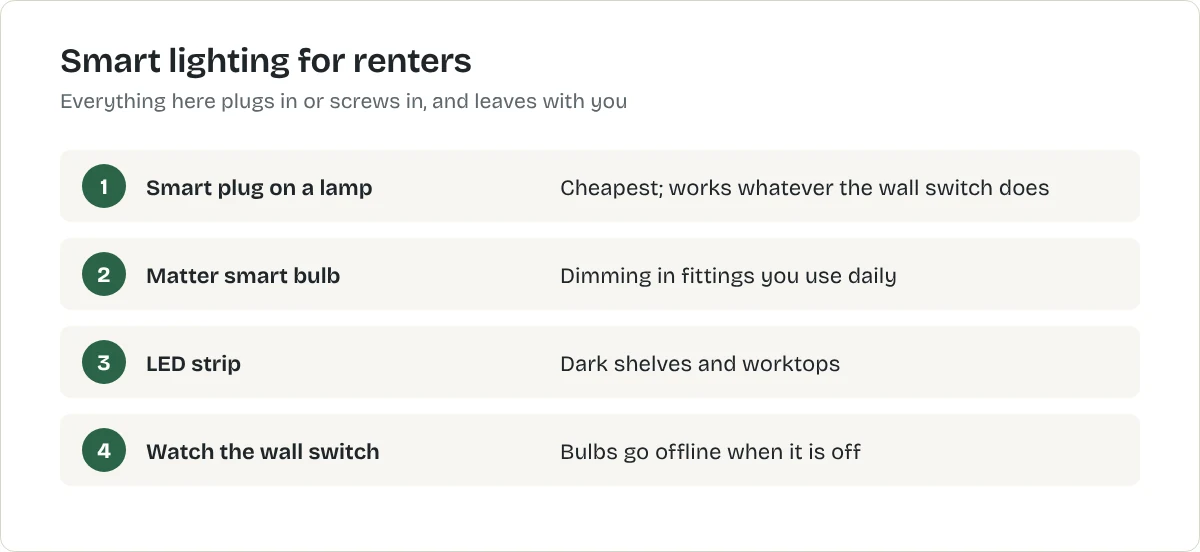
A smart bulb only works while the wall switch is on. If housemates or guests flick it off, the bulb goes offline. Either put a strip of tape and a note on the switch, or use a smart plug on a lamp instead, which avoids the problem entirely.
Our picks at a glance
| Product | Best for | Price | Where to buy |
|---|---|---|---|
| Matter smart LED bulb | lamps and ceiling lights you are allowed to keep | US: See retailerUK: See retailerCA: See retailerAU: See retailerChoose a country | United States
United Kingdom
Not listed with our CA retailers yet. Not listed with our AU retailers yet. Where are you shopping? |
| Smart LED light strip | under-cabinet and shelf lighting | US: See retailerUK: See retailerCA: See retailerAU: See retailerChoose a country | United States
United Kingdom
Not listed with our CA retailers yet. Not listed with our AU retailers yet. Where are you shopping? |
| Kasa Smart Plug Mini EP25TP-Link | a first smart plug in the US | US: See retailerUK: See retailerCA: See retailerAU: See retailerChoose a country | United States
Not listed with our UK retailers yet. Not listed with our CA retailers yet. Not listed with our AU retailers yet. Where are you shopping? |
| Tapo P110 Mini Smart Wi-Fi PlugTP-Link | a first smart plug in the UK | US: See retailerUK: See retailerCA: See retailerAU: See retailerChoose a country | Not listed with our US retailers yet. United Kingdom
Not listed with our CA retailers yet. Not listed with our AU retailers yet. Where are you shopping? |
Swipe sideways to see every column.
The picks in detail
For ceiling lights and lamps: a Matter smart bulb
Best for lamps and ceiling lights you are allowed to keep
Matter smart LED bulb
A Wi-Fi or Thread LED bulb with dimming and schedules that works with Alexa, Google Home and Apple Home through Matter. This is a type of product, not one model. The button opens the retailer's results for it, so compare a few before you choose.
What we like
- Fits your existing fittings
- Dimming and colour temperature without new switches
- Matter keeps your options open if you change systems
What to know
- Only works while the wall switch stays on
- Fittings differ: E26 in the US, B22 or E27 in the UK
- Thread versions need a Thread border router, such as some smart speakers
United States
United Kingdom
Not listed with our CA retailers yet.
Not listed with our AU retailers yet.
Research-based recommendation: we have not tested this product ourselves. How we evaluate products. Details checked October 2026.
For shelves and worktops: a smart LED strip
Test the adhesive on a hidden spot first, because some strips lift paint when removed.
Best for under-cabinet and shelf lighting
Smart LED light strip
A self-adhesive strip of LEDs controlled from an app or by voice. This is a type of product, not one model. The button opens the retailer's results for it, so compare a few before you choose.
What we like
- Lights dark shelves and worktops
- Cuts to length on most
- Plug-in power supply
What to know
- The adhesive can lift paint: test a hidden spot
- Cheap strips have uneven colour
- Visible dots unless you add a diffuser channel
United States
United Kingdom
Not listed with our CA retailers yet.
Not listed with our AU retailers yet.
Research-based recommendation: we have not tested this product ourselves. How we evaluate products. Details checked October 2026.
For lamps you already own: a smart plug
The cheapest smart light is an ordinary lamp on a smart plug. It works whatever the wall switch is doing. Smart plugs for beginners explains setup.
Best for a first smart plug in the US
TP-Link
Kasa Smart Plug Mini EP25
A compact Wi-Fi smart plug with energy monitoring. No hub is needed. US plug and voltage only.
- Real-time and historical energy monitoring in the Kasa app
- Works with Amazon Alexa, Google Assistant, Apple Home (Siri) and Samsung SmartThings
What we like
- Shows what the plugged-in appliance actually uses
- Compact, so it should not block the second outlet
- UL-certified, flame-retardant housing
What to know
- Not a Matter device; TP-Link sells a separate Matter model
- Maximum load is 15 A / 1,800 W: check heaters and other high-power appliances against it
- US model only: it will not work in UK sockets
- Maximum load
- 15 A / 1,800 W
- Energy monitoring
- Yes
- Hub required
- No
- Warranty
- 2-year limited
United States
Not listed with our UK retailers yet.
Not listed with our CA retailers yet.
Not listed with our AU retailers yet.
Research-based recommendation: we have not tested this product ourselves. How we evaluate products. Details checked October 2026. Specifications from TP-Link's product announcement.
Best for a first smart plug in the UK
TP-Link
Tapo P110 Mini Smart Wi-Fi Plug
A compact 13 A Wi-Fi smart plug with energy monitoring in the Tapo app. No hub is needed. UK plug only.
- Energy monitoring in the Tapo app
- Works with Amazon Alexa and Google Assistant
What we like
- Shows what the plugged-in appliance actually uses
- Compact body
- No hub required
What to know
- Connects on 2.4 GHz Wi-Fi only
- TP-Link says not to use it with large-motor appliances such as air conditioners
- The plug itself draws a little power: 0.64 W in standby by TP-Link's figures
- Maximum load
- 13 A / 2,990 W
- Energy monitoring
- Yes
- Wi-Fi
- 2.4 GHz
- Hub required
- No
- Size
- 51 × 72 × 40 mm
Not listed with our US retailers yet.
United Kingdom
Not listed with our CA retailers yet.
Not listed with our AU retailers yet.
Research-based recommendation: we have not tested this product ourselves. How we evaluate products. Details checked October 2026. Specifications from TP-Link's UK product page.
How we chose
These are research-based recommendations: we compared published specifications, maker documentation and the features that matter in a small home. We have not tested them hands-on. Most picks are types of product rather than single models, so the buttons open the retailer's results; compare a few listings before you buy, in your own country's store.
Mistakes to avoid
- Mixing too many apps. Pick one system, such as Apple Home, Google Home or Alexa, and check each light works with it. Matter makes this easier.
- Buying the wrong fitting. Check the base type on your existing bulbs before ordering.
- Leaving the original bulbs in a drawer you forget. Label them and keep them with your move-out paperwork.
- Skipping security basics. Use a strong, unique password for each account and turn on two-factor sign-in.
A simple routine to start with
Set the main living-room lamp to switch on at sunset and off at bedtime. Set a warm, dim scene for the evening and a brighter, cooler one for work in the morning. Two or three routines that solve a real annoyance are better than a dozen you never use.
Getting the most from smart lights
Set scenes rather than adjusting bulbs one by one: a bright "cleaning" scene, a warm "evening" scene and a dim "night" scene for trips to the bathroom. Schedule a gradual brightening in the morning if you wake before it is light. Keep the wall switch on, or fit a stick-on smart switch over it, because a bulb switched off at the wall cannot be controlled by app or voice.
When you move out
Put the landlord's original bulbs back, remove the bulbs from your app, and take yours with you. They will work in the next home if the fitting matches; check for screw or bayonet fittings before buying more.
The bottom line
Start with a smart plug on your main lamp. Add Matter bulbs where you want dimming in fittings you use daily, and a strip where a shelf or worktop is dark. For the bigger picture, see the smart home starter guide.
Frequently asked questions
Can renters use smart bulbs?
Yes. Smart bulbs screw or push into your existing fittings. Keep the original bulbs and refit them when you move out.
Why does my smart bulb stop working?
Usually because someone turned off the wall switch. A smart bulb only works while it has power.
Do I need a hub for smart lights?
Wi-Fi bulbs need no hub. Thread bulbs need a Thread border router, which is built into some smart speakers and hubs.
Related articles
Smart Home
Best Smart Home Devices for Beginners
Start a smart home with three or four devices that solve real problems: a smart plug, a smart bulb, a speaker to control them and a leak sensor under the sink.
Smart Home
Best Smart Plugs
Three smart plugs compared on the specifications that matter: load rating, energy monitoring, Matter and which country's socket they fit.
Smart Home
What Is Matter and Do You Need It?
Matter is a shared standard that lets one smart device work with Apple Home, Google Home, Alexa and others. What it is, what Thread has to do with it, and when it matters for you.