Ergonomic Desk Setup: Chair, Keyboard and Screen Heights
Set up any desk in five steps: chair height first, then keyboard, screen, light and breaks. Based on OSHA's computer workstation guidance, with fixes for laptops and small spaces.
In this article
What you need to know first
Good posture at a desk is mostly geometry: the chair, the keyboard and the screen at the right heights relative to you. Set them in order, chair first, because everything else depends on where you sit. The guidance below follows OSHA's computer workstation eTool.
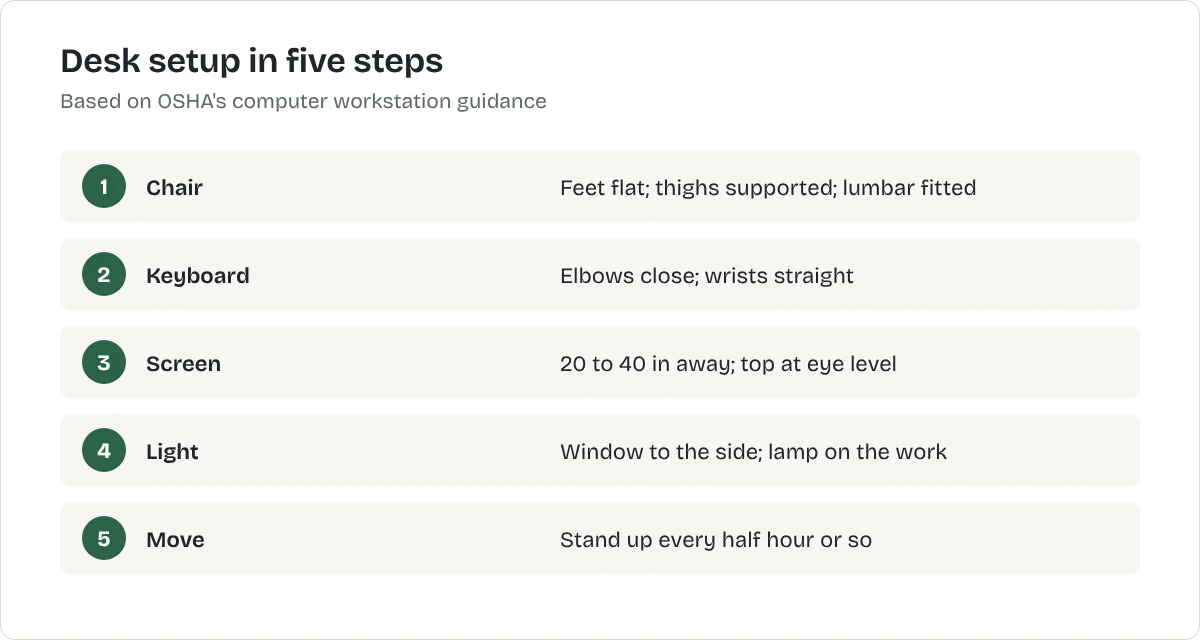
Step 1: Set the chair
- Height: your whole foot rests on the floor and the back of your knee is slightly above the seat. If the chair will not go low enough for the desk, raise the chair for the desk and add a footrest.
- Depth: the seat supports your thighs without the front edge pressing behind your knees.
- Lumbar support: adjusted to the curve of your lower back. No lumbar support? A rolled towel or a removable cushion helps for now.
- Armrests: only if they adjust to support your forearms with shoulders relaxed. Otherwise remove them.
Best for dining chairs used for work
Lumbar support cushion
A firm cushion that straps to the chair back to support the lower back. This is a type of product, not one model. The button opens the retailer's results for it, so compare a few before you choose.
What we like
- Makes a dining chair usable for longer
- Cheap
- Moves between chairs
What to know
- Not a substitute for an adjustable chair
- Straps slip on smooth backs
- Foam softens over time
United States
United Kingdom
Not listed with our CA retailers yet.
Not listed with our AU retailers yet.
Research-based recommendation: we have not tested this product ourselves. How we evaluate products. Details checked October 2026.
Step 2: Set the keyboard and mouse
Keep your elbows close to your body and your wrists straight, not bent up, down or to the side. Put the mouse right next to the keyboard so you do not reach.
Step 3: Set the screen
- Distance: at least 20 inches (50 cm) from your eyes; OSHA gives 20 to 40 inches as the preferred range.
- Height: top of the screen at or slightly below eye level.
- Position: directly in front of you, so your head, neck and body face forward.
With a laptop, you cannot meet the keyboard and screen rules at once. Raise it on a stand and add a separate keyboard and mouse.
Best for raising a laptop screen to eye level
Adjustable laptop stand
A folding stand that lifts the laptop so the top of the screen sits near eye level. This is a type of product, not one model. The button opens the retailer's results for it, so compare a few before you choose.
What we like
- Fixes the biggest posture problem of laptop working
- Folds flat, so the desk can be cleared at night
- Improves airflow under the laptop
What to know
- You need a separate keyboard and mouse to use it properly
- Light stands can wobble when you type on the laptop itself
- Check the stand's weight and size limits against your laptop
United States
United Kingdom
Not listed with our CA retailers yet.
Not listed with our AU retailers yet.
Research-based recommendation: we have not tested this product ourselves. How we evaluate products. Details checked October 2026.
Best for freeing desk space under a monitor
Single monitor arm with desk clamp
An arm that clamps to the desk edge and holds the monitor off the surface. This is a type of product, not one model. The button opens the retailer's results for it, so compare a few before you choose.
What we like
- Clears the desk beneath the screen
- Height and distance adjust in seconds
- Clamps to the desk: no holes in the wall
What to know
- Check your monitor's weight and VESA mount size against the arm
- The clamp needs a solid desk edge of the right thickness
- A desk pushed tight to a wall leaves the arm little room to move
United States
United Kingdom
Not listed with our CA retailers yet.
Not listed with our AU retailers yet.
Research-based recommendation: we have not tested this product ourselves. How we evaluate products. Details checked October 2026.
Step 4: Fix the light
Put the screen side-on to the window, so daylight does not glare on it or come from behind it. Add a desk lamp aimed at your work, not at the screen.
Step 5: Move
No setup makes sitting still for hours comfortable. Stand up and move every half hour or so. If you want to work standing for some of the day, see standing desks for small spaces.
In a small space
- A desk around 24 inches (60 cm) deep gives a monitor enough distance; shallower desks suit a laptop on a stand.
- A clamp-on monitor arm frees desk depth and needs no wall fixing.
- A dining chair works for short sessions with a lumbar cushion and a footrest if needed.
More on fitting a desk into a small room is in how to build a home office in a small bedroom and best office chairs for small spaces.
Common mistakes to avoid
- Setting the desk first and the chair to match. Start with your feet on the floor.
- Laptop flat on the desk all day.
- Screen to one side, so you twist all day.
- Monitor on top of a computer case or a stack of books that is too tall.
What to do next
Check each step with a tape measure this week, then adjust one thing at a time.
Check your setup in two minutes
- Feet: flat on the floor or a footrest.
- Knees: roughly level with or slightly below your hips.
- Back: supported by the chair, with a cushion at the curve of your lower back if needed.
- Elbows: close to your sides, bent at about a right angle, forearms level.
- Wrists: straight, not bent up or down while typing.
- Screen: an arm's length away, top at or just below eye level.
Working from a laptop
A laptop on a table forces you to choose between a good screen height and a good keyboard height. The fix is a laptop stand plus a separate keyboard and mouse. If you cannot buy them yet, raise the laptop on books for video calls and long reading, and lower it for typing.
Move often
The best posture is the next one. Change position, stand up and walk during calls, and look away from the screen regularly. A short break every half hour does more than any one perfect setting.
Frequently asked questions
How high should my monitor be?
OSHA advises that the top of the screen should be at or slightly below eye level, at least 20 inches (50 cm) from your eyes, with 20 to 40 inches the preferred range.
How high should my chair be?
High enough that your whole foot rests on the floor with the back of your knee slightly above the seat. Use a footrest if the chair will not go low enough.
Can a laptop be ergonomic?
Not on its own, because the screen and keyboard are joined. Raise the laptop on a stand and use a separate keyboard and mouse.
Sources
Related articles
Home Office
How to Build a Home Office in a Small Bedroom
Fit a workspace into a bedroom or a living-room corner without wrecking your posture or your sleep: where to put the desk, how to set it up and how to make it disappear at night.
Home Office
Best Office Chairs for Small Spaces
An armless task chair tucks away, a compact ergonomic chair supports long days, and a lumbar cushion rescues a dining chair. Here is how to choose using OSHA's guidance.
Home Office
Small Apartment Home Office Ideas
Eight ways to fit a workspace into a small apartment, from a corner desk to a closet office, with the measurements that make each one work.